ARTICLE
Financial Reporting Challenges: 7 Fixes That Actually Work
Struggling with inaccurate or delayed financial reports? See the most common pitfalls and the exact steps to solve them permanently.
6 common XBRL errors that happen when tagging is rushed - and a practical checklist to prevent them in your next ESEF filing.
Every reporting season, the same pattern plays out. The financial statements are finalised, the narrative is approved, and the team turns its attention to XBRL tagging - often with days, not weeks, left before the filing deadline.
What happens next is predictable: rushed tagging, inconsistent reviews, and errors that could have been caught weeks earlier.
This isn't a technology problem. It's a timing problem. And it's one that most finance teams can solve, if they understand where it comes from and how to change the process.
The six most common last-minute XBRL errors at a glance:
| # | The error | Why it happens / quick fix |
|---|---|---|
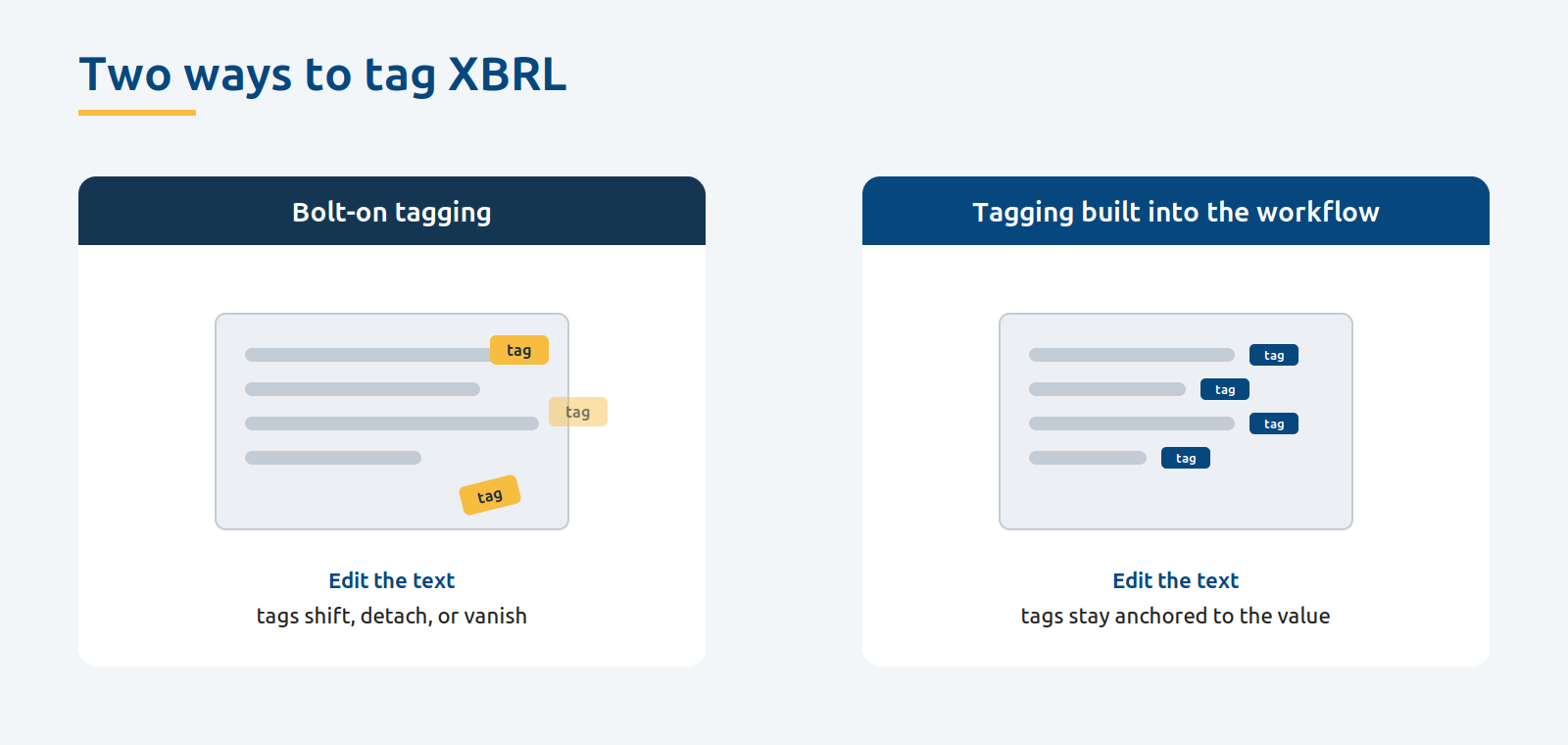
| 1 | Tags that shift, detach, or disappear after editing | Bolt-on tagging ties tags to positions in the file; tag inside the document instead |
| 2 | Incorrect sign values | Teams follow accounting intuition rather than taxonomy rules |
| 3 | Wrong taxonomy elements | Time pressure leads to mismapping; use standard elements where they exist |
| 4 | Period and context mismatches | Confusing point-in-time with duration values; double-check contexts |
| 5 | Outdated taxonomy versions | Last year's taxonomy used without checking; verify the version before you start |
| 6 | Missing or incomplete block tags | Notes get rushed or skipped at the end |
Most of these happen because tagging is treated as a separate step at the end of the process rather than built into the workflow.
XBRL tagging is rarely anyone's favourite task. It's technical, detail-oriented, and feels like a separate project bolted onto the end of the reporting process.
That's exactly how most teams treat it.
The typical workflow looks like this: write the report, get it reviewed, finalise the numbers, approve the design - and then, with the deadline approaching, hand the document over for tagging. Sometimes to an external specialist. Sometimes to someone on the team who "knows XBRL."
The result is a compressed window where the most error-prone part of the process gets the least amount of time and attention.
And the data backs this up. In the European ESEF context, XBRL International has documented a recurring pattern of common errors across hundreds of filings - many of them avoidable with earlier review.
The errors aren't exotic. They're the basics: wrong signs on values, incorrect taxonomy elements, mismatched periods, and missing mandatory tags.
This is part of a broader pattern where compliance work gets separated from the reporting workflow. For a full overview of what typically falls through the cracks, see The Annual Report Checklist: What CFO Teams Forget Every Year.
Understanding what goes wrong is the first step to preventing it. Here are the errors that show up most often when tagging is rushed.
1. Tags that move, disappear, or break after editing.
This is the one that can frustrate teams the most - because it happens even when the tagging was done correctly. In bolt-on tagging setups, where XBRL is applied as a layer on top of a finished document, tags are tied to specific positions in the file. When someone edits the text, updates a table, or adjusts the layout, tags can shift to the wrong value, detach entirely, or simply vanish. The team often won't notice until final validation - or worse, after filing. This isn't a human error. It's a software architecture problem that disappears when tagging is built into the document rather than applied on top of it.
2. Incorrect sign values.
XBRL has strict conventions about whether a number should be positive or negative. Tax expense is positive, even though it reduces profit. When someone tags in a hurry, they often follow accounting intuition rather than taxonomy rules, and the signs end up wrong. XBRL International identifies incorrect signs as one of the most common and potentially serious errors in ESEF filings.
3. Wrong taxonomy elements.
Mapping a financial line item to the wrong XBRL element is easy to do under time pressure. "Trade receivables" tagged as "other receivables." A custom extension used where a standard element exists. These errors make the data incomparable and can trigger regulator queries.
4. Period and context mismatches.
Some XBRL tags represent a point in time (like cash on hand at year-end). Others represent a duration (like revenue for the year). Mixing these up - tagging revenue as an instant value, or tagging a balance sheet item as a duration - is a common mistake when the person tagging is working fast and not double-checking contexts. In its analysis of ESEF filings, XBRL International found incorrect dates in around 180 reports out of a sample of fewer than 700 - often arising from opening balances.
5. Outdated taxonomy versions.
ESEF taxonomies are updated regularly. If your team starts tagging using last year's taxonomy without verifying the current version, you may be filing with outdated or deprecated elements. This is an entirely avoidable error that happens because nobody checked before the work began.
6. Missing or incomplete block tags.
European ESEF filers are required to apply block tags to notes in the financial statements. When tagging is left to the last days, teams often focus on the primary financial statements and rush through - or skip - the notes. The result is incomplete tagging that may not meet regulatory requirements.
It's tempting to dismiss tagging errors as minor technical issues. After all, the financial statements themselves are correct - the tagging is just the digital wrapper, right?
Not quite.
XBRL data is increasingly the primary way that regulators, investors, and data aggregators consume financial information. They don't read the PDF. They pull the tagged data. If your tags are wrong, the data they see is wrong - even if your report is perfect.
For listed companies, this has real consequences. Regulators like ESMA are paying closer attention to data quality. In Europe, auditors are now expected to provide opinions on ESEF compliance.
Beyond regulation, there's reputation. A company that files XBRL data showing negative revenue or misclassified assets looks careless - regardless of what the narrative report says. Investors and analysts who rely on machine-readable data will see the error before anyone reads a single page of your annual report.
The solution isn't to hire more XBRL specialists or to start tagging earlier within the same broken workflow. The solution is to change when and how tagging happens.
Here's what that looks like in practice.
Tag as you write, not after you finish.
The single most impactful change you can make is to apply XBRL tags while the content is being created, not as a separate step at the end. When tagging happens alongside writing, errors are caught in context - you can see immediately whether a tag matches the number it's attached to.
This approach works best when your entire reporting process is already structured for in-house control. Read more about how to run your first reporting cycle without external consultants.
Verify your taxonomy version before you start.
Before anyone writes a single word of the report, confirm which ESEF taxonomy version applies to your reporting period. This takes five minutes and prevents a category of errors that otherwise only surfaces during final validation.
Use automated validation throughout.
Don't wait until the final file is generated to run validation checks. Modern reporting tools can validate tags in real time - flagging sign errors, missing elements, and context mismatches as they happen, not after 50 pages have been tagged.
Separate your reviews.
The person reviewing the narrative content should not be the same person reviewing the XBRL tags. These are different skills. Schedule a dedicated compliance review as part of your timeline - not as a last-minute add-on.
Build tagging into your project plan.
If your reporting timeline has milestones for "first draft," "board review," and "design finalisation" but nothing for "tagging started" or "tagging reviewed," you've already set yourself up to rush. Treat tagging as a first-class milestone, not an afterthought.
Use this as a practical reference for your next reporting cycle.
Before you start writing:
During the writing process:
Before filing:
The teams that avoid last-minute XBRL problems aren't the ones with the most technical expertise. They're the ones that have built tagging into their process from the start.
When tagging is treated as part of the reporting workflow, not a separate project that happens after everything else is done - the pressure disappears. Errors get caught early. Reviews happen calmly. And the final days before filing are spent on final checks, not frantic fixes.
If you're still relying on fragmented tools and manual processes, the tagging problem is just a symptom. Learn more about the real cost of financial reporting systems and what it takes to simplify.
That's the difference between a reporting process that works and one that survives.
What is the most common XBRL error in ESEF filings?
Incorrect sign values - tagging a number as negative when the taxonomy expects positive, or vice versa - is one of the most frequently flagged errors. It happens because preparers follow accounting intuition rather than the taxonomy's sign conventions. Incorrect dates, often from opening balances, are also very common: XBRL International found them in around 180 reports out of a sample of fewer than 700.
Can XBRL tags break after you edit a document?
Yes. In bolt-on tagging setups, where XBRL is applied on top of a finished file, tags are tied to specific positions in the document. Editing text, updating a table, or changing the layout can cause tags to shift to the wrong value, detach, or disappear entirely. This is avoided when tagging is built into the document rather than layered on afterwards.
When should XBRL tagging happen in the reporting process?
Tagging should happen while the report is being written, not as a separate step at the end. Applying tags as content is created means errors are caught in context, and it removes the compressed, error-prone window that appears when tagging is left until the final days before filing.
What happens if you file XBRL data with errors?
XBRL data is increasingly how regulators, investors, and data aggregators consume financial information - they read the tagged data, not the PDF. Errors can make your data incomparable, trigger regulator queries, and damage credibility, even when the underlying financial statements are correct. In Europe, auditors are now expected to provide opinions on ESEF compliance.
At Wrepit, we built XBRL tagging directly into the reporting workflow. There's no separate tool, no external handoff, and no last-minute scramble.
Used by 60+ companies in Norway, including around 10% of those listed on the Oslo Stock Exchange, Wrepit helps finance teams avoid the most common tagging pitfalls:
The result is a tagging process that's accurate, efficient, and entirely in your team's control. See how these features work in practice.
Book a free demo and see how it works - in 20 minutes.
Struggling with inaccurate or delayed financial reports? See the most common pitfalls and the exact steps to solve them permanently.
Take control of your reporting process. Learn how CFO teams can run a complete annual reporting cycle in-house - without consultants, designers, or...
Discover the real cost of financial reporting systems for companies - from time and complexity to compliance, and how to simplify reporting.
Take your reporting to the next level with Wrepit. Unleash your potential as you delve into groundbreaking insights and cutting-edge techniques in crafting interactive reports. Elevate your reporting prowess with the latest innovations in the industry.